Okay, you’ve got the database idea and the concept of relationships. Now what about users who just don’t understand butterfly names?
I mean, how could anyone think that calling a Papilio glaucus an “Eastern Tiger Swallowtail” is the same as “E. Tiger Swallowtale”?! What are they thinking?!
So now when you want to count how many Eastern Tiger Swallowtails you have in your database, you need to count every possible version? Now pile on Swallowtail vs. swallowtail vs. “that big yellow one.”
The horror!
Here’s what that mess looks like in our ButterflySpotted table from Step 1:
| AutomaticID | ButterflyName | UserAccountNumber | LocationSpotted |
|---|---|---|---|
| 1 | Eastern Tiger Swallowtail | 1001 | Lancaster, PA |
| 2 | E. Tiger Swallowtale | 1002 | York, PA |
| 3 | eastern tiger swallowtail | 1003 | Hershey, PA |
| 4 | that big yellow one | 1004 | Lititz, PA |
Four sightings of the exact same butterfly species.
Ask the database how many sightings have the name “Eastern Tiger Swallowtail” and, with an exact text match, it says 1.
The database isn’t being dumb. It’s being literal.
It has no idea those are the same butterfly.
And sure, you could write some clever code to handle different spellings. But do you really want to spend the rest of your life teaching your database every creative way somebody can misspell Swallowtail?
I don’t.
The Fix: A Butterflies Table
So let’s do this.
Instead of letting everybody type in whatever butterfly name they feel like that day, we give the butterflies a table of their very own.
It has three fields:
ButterflyID— an auto-increment primary key (remember those?)CommonName— the butterfly’s common nameScientificName— its scientific name
| ButterflyID | CommonName | ScientificName |
|---|---|---|
| 1 | Eastern Tiger Swallowtail | Papilio glaucus |
| 2 | Monarch | Danaus plexippus |
| 3 | Red Admiral | Vanessa atalanta |
This is where Papilio glaucus finally gets a proper home.
Took long enough!
Now the ButterflySpotted table swaps out the ButterflyName column for a ButterflyID column.
That’s a foreign key, just like UserAccountNumber was in Step 1. It points to the Butterflies table.
Our original four sightings now look like this:
| AutomaticID | ButterflyID | UserAccountNumber | LocationSpotted | DateSpotted |
|---|---|---|---|---|
| 1 | 1 | 1001 | Lancaster, PA | 2026-06-14 |
| 2 | 1 | 1002 | York, PA | 2026-06-20 |
| 3 | 1 | 1003 | Hershey, PA | 2026-07-02 |
| 4 | 1 | 1004 | Lititz, PA | 2026-07-09 |
Notice there isn’t a single butterfly name in there.
Just numbers.
The ButterflySpotted table doesn’t need to know how to spell Swallowtail. It just needs to know it’s butterfly number 1.
And because all four sightings point to the same species record, we finally have a consistent way to identify what people spotted.
Of course, somebody still has to make sure “that big yellow one” actually is an Eastern Tiger Swallowtail before assigning it ButterflyID 1. Normalization doesn’t magically turn your database into a butterfly expert.
Although, with AI image recognition, we might eventually be able to help with that too.
But that’s another conversation.
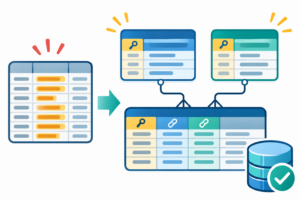
Why This Is So Much Better
Fix it once and it’s fixed everywhere.
Say you typed “Eastern Tiger Swallowtial” into the Butterflies table.
It happens to the best of us.
Fix that one row and every sighting that points to butterfly number 1 now shows the correct name whenever you retrieve it through the relationship.
No hunting through thousands of sightings.
Same goes for adding species information.
Want to add a representative photo of an Eastern Tiger Swallowtail? Or its typical wingspan?
Add that information to the Butterflies table.
Now, a photo that somebody actually took when they spotted a butterfly? That belongs with the individual sighting.
See the difference?
One describes the species. The other describes something that happened.
Each piece of information has a place where it belongs.
Users pick from a list instead of typing.
Your app can fill a dropdown straight from the Butterflies table.
No more Swallowtales!
And the “that big yellow one” crowd?
Show them pictures in that list. Maybe let them search by common name or scientific name.
That one’s on you.
The important part is that no matter how somebody finds the butterfly, the app saves its ButterflyID, not whatever text they happened to type.
The counts are right now.
Want to know how many Eastern Tiger Swallowtails have been spotted?
Count the rows where ButterflyID is 1.
Done.
SELECT COUNT(*)
FROM ButterflySpotted
WHERE ButterflyID = 1;
In plain English:
“Count every sighting where the butterfly is species number 1.”
That gives you 4, and 4 is the right answer.
No creative spelling required.
Name It: Normalization
What we just did has a name: normalization.
Here’s the plain-English version: store each fact where it belongs, and don’t keep unnecessary copies of information that should have one reliable home.
The official name of a butterfly species belongs in the Butterflies table, not in every individual sighting.
That’s the basic idea.
Technically, normalization is a way of organizing database tables to reduce unnecessary duplication and avoid problems when information gets added, changed, or deleted.
And yes, there’s a whole science behind it.
If you go digging, you’ll find database folks talking about “normal forms.”
First normal form (1NF), second normal form (2NF), third normal form (3NF), and yes, it keeps going.
There’s even one called Boyce-Codd.
Database people love numbered rules almost as much as butterflies hate duplicate accounts.
You don’t need to memorize any of them right now.
What I want you to understand is the underlying principle: information should be organized so that changing one fact doesn’t require fixing that same fact in a hundred different places.
That’s the problem we’re solving.
And before somebody sends me an email explaining all the ways normalization is more complicated than that, yes, I know.
We’re learning to build applications here, not defending a doctoral thesis in relational algebra.
We can get fancy later.
The Three-Table JOIN
Here’s where it all comes together.
Remember in Step 1 how we JOINed Users and ButterflySpotted?
Now we just add one more JOIN to bring in the Butterflies table.
Let’s expand our sample data a little. In addition to the four Eastern Tiger Swallowtail sightings, we’ve now recorded a Monarch and a Red Admiral.
Our ButterflySpotted table has six sightings, and our Butterflies table has three species.
Let’s ask the database to tell us who spotted what and where.
SELECT Users.UserFirstName,
       Butterflies.CommonName,
       Butterflies.ScientificName,
       ButterflySpotted.LocationSpotted

FROM ButterflySpotted

JOIN Users
  ON Users.UserAccountNumber =
     ButterflySpotted.UserAccountNumber

JOIN Butterflies
  ON Butterflies.ButterflyID =
     ButterflySpotted.ButterflyID

ORDER BY ButterflySpotted.AutomaticID;
And here’s what the database hands back:
| UserFirstName | CommonName | ScientificName | LocationSpotted |
|---|---|---|---|
| Troy | Eastern Tiger Swallowtail | Papilio glaucus | Lancaster, PA |
| Jody | Eastern Tiger Swallowtail | Papilio glaucus | York, PA |
| Alex | Eastern Tiger Swallowtail | Papilio glaucus | Hershey, PA |
| Sam | Eastern Tiger Swallowtail | Papilio glaucus | Lititz, PA |
| Jody | Monarch | Danaus plexippus | Hershey, PA |
| Troy | Red Admiral | Vanessa atalanta | Lancaster, PA |
Read that first row out loud:
Troy saw an Eastern Tiger Swallowtail (Papilio glaucus) in Lancaster.
Three tables, one sentence.
How cool is that?
And look at what happened.
We didn’t store Troy’s name, the butterfly’s common name, and the butterfly’s scientific name in every sighting.
We stored references to the records that already contain that information.
When we need the full picture, the JOINs bring it all together.
Same deal as last time. You don’t need to memorize the SQL. AI can write it for you.
What you need to understand is why it works.
Two foreign keys. Two JOINs.
One useful answer.
Relationship Types: One-to-Many
What we’ve built has a name too.
One user can have many sightings.
One butterfly species can have many sightings.
That’s called a one-to-many relationship, and it’s one of the most common relationships you’ll encounter when building applications.
Here’s the structure:
         Users                  Butterflies
       (one user)              (one species)
            |                       |
            |                       |
            v                       v
            +---- ButterflySpotted --+
                  (many sightings)
Each sighting belongs to one user and references one butterfly species.
But the same user can appear in hundreds of sightings, and the same species can be referenced by thousands of sightings.
Here’s the trick to remembering it.
The “one” side holds the primary key that identifies the record.
The “many” side holds the foreign key pointing back to it.
If you remember nothing else from this section, remember that.
And yes, there are other relationship types, including many-to-many.
We’ll deal with those when we need them.
No reason to make the butterflies more complicated than they already are.
Don’t Go Overboard
So should LocationSpotted get its own table too?
Lancaster, PA already shows up more than once.
Maybe.
Maybe not.
If your users type things like “my backyard” or “behind the barn,” a Locations table might not help you much.
Nobody else is necessarily going to see a butterfly in your backyard.
But if you want to drop pins on a map, show how many butterflies were spotted at each park, or associate sightings with specific nature preserves, then a Locations table starts to make a lot of sense.
Something like:
| LocationID | LocationName | Latitude | Longitude |
|---|---|---|---|
| 1 | Lancaster County Park | 40.0123 | -76.2825 |
| 2 | Example Nature Preserve | 40.0456 | -76.3102 |
Coordinates shown are illustrative sample data, not verified park locations.
Now your sightings can reference a LocationID instead of repeatedly storing the park’s name and coordinates.
You can correct a park’s name once, associate sightings with a known location, and build maps without guessing which version of a name somebody typed.
But here’s where judgment comes in.
Normalization is not “split everything into its own table.”
Go too far and you need a ten-table JOIN just to find out who spotted a Monarch.
That’s not clever. That’s painful.
And just because a value repeats doesn’t automatically mean it needs a lookup table.
People can have the same first name. That doesn’t mean we need a FirstNames table.
The question to ask is:
Does this information describe something that has its own identity, details, or relationships that we need to manage?
If yes, a separate table might make sense.
If no, maybe leave it alone.
The goal is a database that’s easy to maintain and makes sense for your application.
Not winning an imaginary competition for who can create the most tables.
What You Just Learned
Let’s recap before the butterflies stage a revolt.
- Lookup table = a table holding a list of things, like butterfly species, that other tables can reference.
- Normalization = organizing data to reduce unnecessary duplication and keep related facts where they belong.
- Normal forms = the formal numbered rules (1NF, 2NF, 3NF…) that describe different levels of normalization.
- One-to-many = one record on one side can relate to many records on the other. The foreign key sits on the “many” side.
- Multi-table JOIN = connecting multiple tables through their relationships to retrieve information from all of them.
Most importantly, you’ve learned that a database isn’t just a big spreadsheet full of information.
It’s a system of related facts.
And how you organize those facts determines how useful that system becomes.
Why This Matters for AI
Let’s bring this back to why we’re here in the first place.
You want to become an AI engineer.
Or at least you want to build applications using AI without having absolutely no idea what the AI is doing.
Both are excellent goals.
Here’s the thing.
You can ask an AI:
“Hey, build me an app that tracks butterflies.”
And it might build something that looks beautiful.
You’ll have buttons, maps, pictures, maybe even a little butterfly animation.
Fantastic.
But if the AI stores every butterfly name as free-form text, you’ve still got a problem.
The app might work perfectly with ten sightings and become an absolute mess with ten thousand.
And that’s exactly the kind of problem that’s easier to prevent than fix later.
This is why we’re learning the fundamentals.
Not because you need to write every line of code yourself, but because you need to recognize whether the code and database design actually make sense.
Last time, we went from:
“Hey AI, make me an app that can track butterflies.”
To telling it about primary keys, foreign keys, and relationships.
Now you can go one better:
Create a Butterflies lookup table with ButterflyID as the primary key, along with CommonName and ScientificName. In ButterflySpotted, reference ButterflyID using a foreign key instead of storing the butterfly name as free-form text. Make sure users select an existing species when recording a sighting.
That’s a much better instruction.
You’ve described not just what you want your application to do, but how an important part of its data should be organized.
And here’s a practical tip you can use today.
When an AI hands you a database design, take a look at the columns and the sample data.
If you see the same descriptive text appearing over and over — butterfly names, product categories, status descriptions, location names — that’s something worth investigating.
It doesn’t automatically mean the design is wrong.
But it should make you ask a question.
Something like:
Hey AI, I notice we’re repeating the same values in this column. Should this be a lookup table? Explain the advantages and disadvantages of normalizing it for this particular application.
Now you’re doing something important.
You’re not just accepting whatever the AI generates.
You’re asking it to explain its engineering decisions.
And because you understand the concept, you have a fighting chance of deciding whether its explanation makes sense.
Remember, AI can generate code incredibly quickly.
It can also generate a terrible database design incredibly quickly.
Speed isn’t the same thing as good engineering.
Understanding what you’re building is what helps you tell the difference.
Coming Up Next: Let’s Talk SQL
Okay, so now you’re thinking, “I’ve got this database stuff figured out, right?”
Well, almost.
We’ve figured out how to organize the data and how everything connects.
But how do we actually find out what’s in there?
How do we ask questions like:
“Who spotted the most Monarchs?”
“How many butterflies were spotted in Pennsylvania last month?”
“Which butterfly species has never been spotted by Troy?”
That’s where SQL comes in.
Next up, we’re going to start talking to our database.
And no, you don’t need to become a SQL expert.
That’s what your AI assistant is for.
You just need to understand what questions to ask, what answers to expect, and how to recognize when something doesn’t look right.
Because sooner or later, the AI is going to tell you there are 47 Monarchs in your database, and you’re going to want to know where that number came from.
It’s SQL time, people. 😉
Written by Troy Lee Yohn, with AI assistance for editing and technical review. The ideas, examples, questionable butterfly humor, and opinions about Excel, SQL and AI are my own.
No Comment